“NFC Tag Detected” means your smartphone or another NFC-enabled device has recognized a nearby NFC tag or compatible contactless chip. The device can then communicate with the tag to read stored information or initiate a supported action.
You may see this notification when your phone comes close to an NFC sticker, access card, contactless bank card, or smart product label. Depending on the tag and your phone’s settings, it may open a website, launch an app, or simply display a notification.
NFC detection is also the technology behind many contactless systems used in retail, access control, product identification, and asset management.
How Does NFC Tag Detection Work?
Near Field Communication (NFC) is a short-range wireless technology that operates at 13.56 MHz. It allows compatible devices to exchange information when they are brought close together, usually within a few centimeters.
Most NFC tags are passive, meaning they do not need batteries. A typical detection process works as follows:
- The NFC reader generates a radio-frequency field. When a phone or reader approaches a passive NFC tag, its antenna produces an electromagnetic field that supplies energy to the tag’s chip through inductive coupling.
- The tag responds to the reader. Once powered, the chip communicates through load modulation, allowing the reader to identify the tag and exchange commands.
- The reader retrieves the data. Depending on the chip and application, the reader may access the tag’s unique identifier (UID), stored information, or other supported data.
Many NFC tags store information using NFC Data Exchange Format (NDEF), a standardized format for URLs, text, and other records. For example, a product label containing an NDEF URL can direct a customer’s phone to a product information page.
NFC tags also use different communication protocols. ISO/IEC 14443 and ISO/IEC 15693 are two important standards supported by NFC technology. The tag and reader must communicate using compatible protocols before data can be exchanged.
What Happens When Your Phone Detects an NFC Tag?
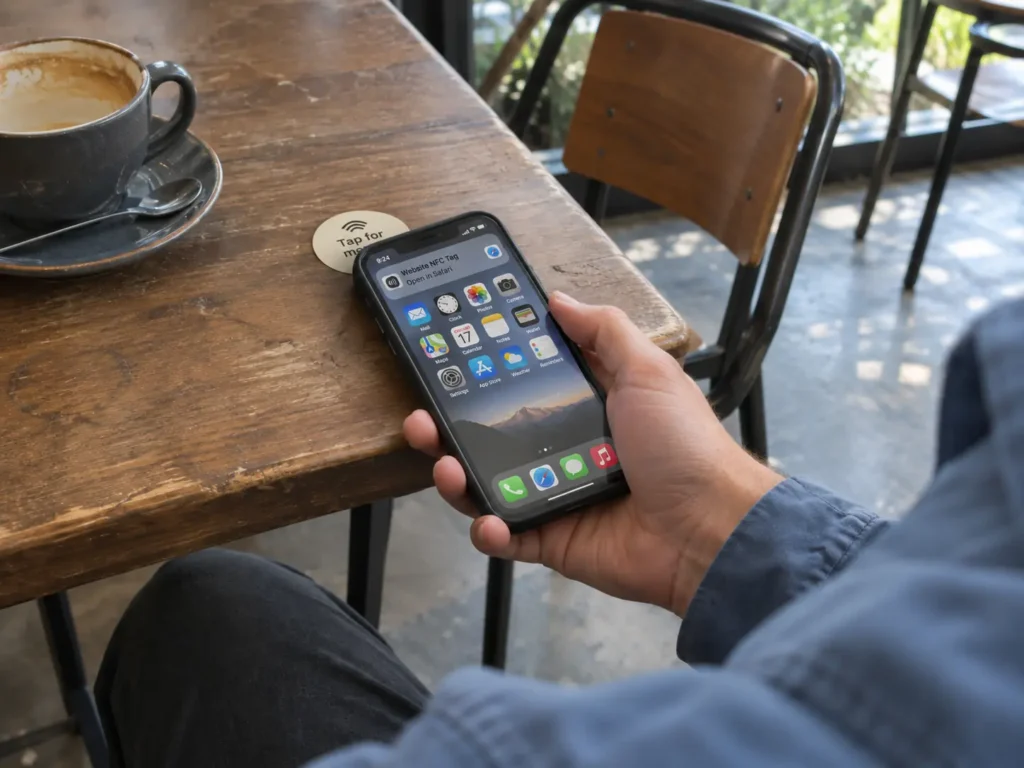
After detecting a compatible NFC tag, your phone determines how to handle the information. The result depends on the tag’s contents, your operating system, and any installed NFC applications.
For example, if an NFC sticker contains a website URL, your phone may display a notification that opens the page when tapped. If the tag contains application-specific information, a compatible app may be needed to read or process it.
The experience differs between iPhone and Android.
On iPhone
iPhone XS, XR, and later models support background NFC tag reading. When the screen is on and background reading is available, the phone can automatically scan compatible NDEF tags containing supported links.
A notification appears when a suitable tag is read. Tapping it opens the associated website or application.
Earlier NFC-equipped models, such as the iPhone 7 and iPhone 8, can read NFC tags through supported applications but do not offer the same background scanning feature.
On Android
Most NFC-enabled Android phones can detect compatible tags when NFC is enabled.
Depending on the Android version and the information stored on the tag, the phone may display a notification, offer to open a link, or pass the data to an installed application.
For example, tapping an NFC business card may bring up a contact page, while scanning a custom-programmed NFC tag may trigger smart home automation.
Some Android phones also display messages such as “Unsupported NFC Tag” when they encounter a contactless chip whose contents cannot be handled by the current application.
Why Does My Phone Keep Saying “NFC Tag Detected”?
Repeated NFC notifications usually occur because a compatible contactless chip remains close to your phone. As the phone moves, it may lose contact with the chip and detect it again.
Common causes include:
- Cards inside your phone case: Contactless payment cards, transit passes, and access cards contain chips that may be detected by your phone’s NFC reader.
- Nearby NFC tags: NFC stickers, product labels, and other tagged objects may trigger a notification when you place your phone on or near them.
- Repeated scanning: Moving your phone across a tag or holding it at the edge of the reading range can cause the connection to start and stop.
For instance, if you keep a contactless bank card in the back of your phone case, some Android phones may repeatedly attempt to communicate with it.
The location of the NFC antenna also matters. On many iPhones, the reading area is near the top of the device. Android antenna locations vary by model, often around the upper or central back panel.
Which NFC Tags Can Smartphones Detect?
Smartphones can communicate with several NFC tag types, including those used in smart labels, identification cards, and industrial applications.
The NFC Forum defines different tag types according to their communication protocols and data structures.
| NFC tag or chip | Main standard | Common applications |
| NTAG213, NTAG215, NTAG216 (Type 2) | ISO/IEC 14443-A | NFC stickers, smart packaging, digital business cards |
| NFC Type 4 tags, including NTAG424 DNA | ISO/IEC 14443-A/B | Product authentication, secure identification |
| ICODE SLIX2 (Type 5) | ISO/IEC 15693 | Asset tracking, inventory, product identification |
NTAG213, NTAG215, and NTAG216 are widely used for smartphone-readable NFC products. Their main difference is available user memory: 144 bytes, 504 bytes, and 888 bytes, respectively.
For a simple website URL, NTAG213 usually provides enough memory. More complex records may require a larger-capacity chip.
Type 4 tags can support more advanced applications, including cryptographic authentication and secure data exchange. Type 5 tags use ISO/IEC 15693 and are common in identification and inventory systems.
However, recognizing an NFC chip and displaying its stored information are separate operations. For example, an access-control card may use a supported NFC protocol but store its credentials in a proprietary or protected format.
Similarly, a blank NFC tag or a tag without a supported NDEF link may be readable through an NFC application without generating a normal background notification.
The chip, its data format, and the reader’s software determine how the tag is handled.
How Is NFC Tag Detection Used in Everyday Life and Business?
NFC detection is widely used in commercial and industrial systems. The same short-range communication technology can connect physical products to digital information, identify authorized users, and support automated processes.
Contactless Access Control
NFC technology is used in hotel key cards, employee ID badges, access-control wristbands, and electronic door locks.
When a compatible card or wristband approaches an access reader, the reader retrieves the required credential information. The access-control system then checks whether the credential has permission to open the door.
For example, hotels can issue NFC-enabled key cards or wristbands that allow guests to enter assigned rooms or access designated facilities.
Many access-control systems also support mobile credentials, allowing authorized smartphones to communicate directly with compatible door readers.
These systems rely on NFC detection, but the authorization process takes place through the access-control software and security mechanisms rather than a standard phone notification.
Smart Packaging and Interactive Marketing
NFC labels can be embedded in product packaging, promotional materials, posters, and retail displays.
When customers tap the label with an NFC-enabled phone, they can access information such as:
- Product specifications, user manuals, or warranty registration
- Authentication pages and product verification services
- Promotional campaigns, videos, or product websites
For example, a manufacturer can place an NTAG213 label inside product packaging and encode it with a URL. Customers can then open the product’s digital information page with a simple tap.
Unlike QR codes, NFC labels do not require users to open a camera or align a printed code. The chip can also be concealed beneath nonmetallic packaging materials while remaining readable.
Product Identification and Asset Tracking
NFC tags are also used to identify equipment, tools, inventory, and individual products.
Each tag can carry a unique identifier that connects a physical item to a record in an asset management system. Employees can scan the tag with a compatible smartphone or handheld reader to retrieve equipment details, maintenance history, or inspection records.
For example, a maintenance technician can tap an NFC label attached to a machine and open its service record. After completing an inspection, the technician can update the record through the connected application.
NFC is particularly suitable for applications requiring intentional, close-range scanning of individual items.
Contactless Payments
NFC also enables contactless payments through bank cards, smartphones, and wearable devices.
When you tap a contactless payment card or a mobile wallet against a payment terminal, the devices communicate using NFC-compatible contactless technology. The terminal and payment application exchange the information required to process the transaction.
Payment systems follow dedicated security protocols, including EMV contactless specifications. Transactions use cryptographic authentication, and mobile wallets commonly use payment tokenization to protect card information.
A normal NFC tag notification on your phone is different from a payment transaction. Reading an NFC sticker containing a website address does not initiate a payment.
Is “NFC Tag Detected” Safe?
Yes. NFC tag detection is a normal function of NFC-enabled devices. Seeing the notification does not indicate that your phone has been hacked or that a payment has been made.
NFC is designed for short-range communication, typically requiring the tag and reader to be only a few centimeters apart.
The main concern with unfamiliar NFC tags is the information they contain. For example, someone could program an NFC sticker with a link to a phishing website. If you open that link and enter sensitive information, your data could be exposed.
Treat unfamiliar NFC links the same way you would an unknown QR code or website address. Check the destination before entering passwords, payment details, or other personal information.
For business applications requiring stronger protection, NFC chips with authentication and access-control features can help protect sensitive operations and stored data.
How to Stop Unwanted NFC Tag Notifications
If your phone repeatedly displays NFC notifications, the simplest solution is to identify and move the nearby contactless item.
1. Check Your Phone Case and Nearby Cards
Remove bank cards, transit passes, and access cards from your phone case. Keep your phone away from NFC stickers or other tagged items and see whether the notifications stop.
2. Turn Off NFC on Android
If you do not need NFC, you can disable it in your Android settings.
Open Settings, search for NFC, and switch the feature off. On some models, the setting appears under Connections or Connected Devices.
Turning NFC off also prevents contactless payments and other NFC functions until you enable it again.
3. Check NFC Detection on iPhone
iPhones with background NFC reading generally do not provide a separate system-wide switch for disabling the feature.
Move nearby NFC cards or tags away from the phone. If the message comes from a specific NFC application, check that app’s scanning settings.
If you use NFC regularly for payments, access control, or automation, removing the nearby tag is usually more convenient than disabling the technology.
Frequently Asked Questions
Can an NFC tag be detected without an internet connection?
Yes. NFC communication takes place directly between the reader and tag, so detecting an NFC tag or reading locally stored information does not require internet access.
However, some NFC applications depend on an online service. For example, a phone can read a website URL stored on an NFC tag while offline, but it needs internet access to load the website.
Similarly, an NFC asset management app may require a network connection to retrieve or update records stored on a remote server.
Can NFC tags be detected through a phone case?
Yes. NFC signals can usually pass through common phone case materials such as plastic, silicone, and leather.
Thick cases, metal plates, or magnetic accessories may affect communication, especially when they sit between the phone’s NFC antenna and the tag.
NFC tag antenna design also affects reading performance. For products mounted directly on metal surfaces, specially designed on-metal NFC tags are often used to maintain reliable communication.
Why does my phone detect an NFC tag but not open anything?
Your phone may recognize the tag’s chip without finding information that it can automatically process.
For example, the tag might be blank, contain data in a proprietary format, or require a specific application. On an iPhone, background notifications also depend on the tag containing a supported NDEF link.
Try reading the tag with an NFC reader app to inspect its available information. If the tag was intended to open a website, check whether it contains a properly encoded NDEF URL record.
Conclusion
NFC detection supports more than smartphone notifications. It connects physical tags, cards, and products to software systems that can retrieve information, verify credentials, or perform specific actions.
For NFC-based products, reliable operation depends on the chip’s communication standard, the antenna design, how the data is encoded, and the software handling the scan. These elements determine whether an NFC interaction simply identifies a tag or completes a useful task.